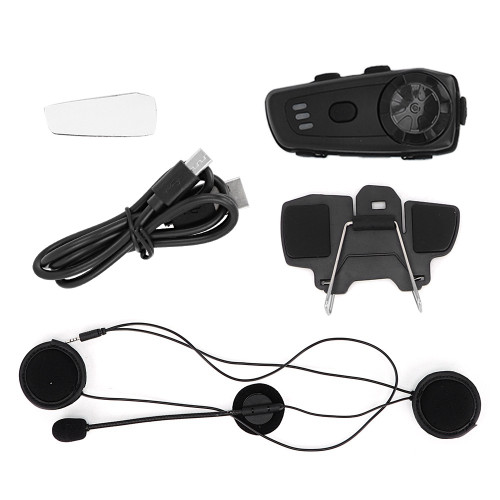
Product Overview
Material: ABS
Color: Black+Red
Working Distance: 1000m/3280.8ft
Working Frequency: 2.4GHz
Supported Bluetooth Protocol: A2DP and AVRCP
Supported Bluetooth Function: Bluetooth headset with automatic detection function and hands-free profiles
Operating Range: Up to 10m/32.8ft for mobile phones
Battery Type: 600mAh rechargeable lithium polymer
Standby Time: Up to 300 hours
Talk Time: Up to 14 hours for mobile phone calls/listen to music; up to 12 hours for intercom
Charging Time: About 2.5 hours
Power Adapter: DC 5V 1A (optional)
Charging Interface: USB Type-C
Working Temperature: 41°F~104°F (5°C~40°C)
Storage Temperature: -4°F~+122°F (-20°C~+50°C)
Weight: Approx.320g/11.3oz
How to Use:
Pair with mobile phone
①Put the Helmet Bluetooth headset that needs to be paired and the mobile phone with Bluetooth function within 1 meter of each other.
②Long press the switch button for 8 seconds, until you see the red and blue lights flashing alternately, the device enters the search pairing state.
③Turn on the Bluetooth function on the mobile phone (some mobile phones need to be set so that all surrounding Bluetooth devices can be detected).
④Search for nearby devices on your mobile phone, you will see the device name "Hysnox";
⑤Click the Bluetooth device name "Hysnox" on the mobile phone, and you will hear a "di di" sound after the pairing is successful. (If you have successfully paired with your phone, you can automatically connect to the phone's Bluetooth in standby mode next time.)
6.2 Pairing between two headsets
①Put the two headset Bluetooth headsets that need to be paired within a visual range of 1 meter apart.
② Make sure that the two intercom headsets have been turned off.
③Press and hold the switch button of the two helmet Bluetooth headsets for 8 seconds to enter the pairing mode (red and blue lights flash alternately); short press the switch button of any of the two helmet Bluetooth headsets, the headset will automatically search for nearby helmets Pair the Bluetooth headset device.
④When the pairing is successful, you will hear a beep, the red and blue lights exit alternately flashing to flashing blue, the headset will have an intercom prompt sound, indicating that the Bluetooth intercom headset is successfully connected and you can start the intercom.
Note:
When the two headset Bluetooth headsets are paired for intercom, you also need to connect the mobile phone, the operation method is as follows:
1. After the two headset Bluetooth headsets are paired successfully, press and hold the power button for 5 seconds to turn off the two headsets;
2. Turn on one of the earphones and operate pairing as described in 6.1, so that the mobile phone is successfully connected to the helmet Bluetooth earphone;
3. Turn on the other headset Bluetooth headset, and short press any switch button of the two headsets. At this time, the two headsets have started real-time intercom.
6.3 Pairing between three headsets
①First, pair the two hosts A and B, see 6.2 for the pairing operation
②Secondly, turn off A and B, pair A and C, see 6.2 for pairing operation
③Third, turn off A and C, pair B and C, see 6.2 for pairing operation
④Last open A
⑤A Press the switch button once to call C, press twice to call B; B press the switch button once to call C, press twice to call A; C press the switch button once to call B, press twice to call A.
Note: When two devices are already in an intercom call, you must first press the power/intercom key once to end the intercom.
Then switch to the intercom according to the above operation ⑤.
Features
1、After being paired with a mobile phone, it can answer incoming calls, reject calls and hang up calls within a visible range of 10 meters.
2、Achieve a full‑duplex intercom with a distance of up to 1000 meters between the helmet Bluetooth headset and the helmet Bluetooth headset. After the intercom is enabled, the mobile phone is still in the standby state to ensure that no calls are missed.
3、Automatically answer the phone function, support last codes re-dial. Support FM radio function.
4、Use the knob to control the previous song and the next song of the mobile phone music, and the multi-function keys control playback and pause.
5、It can realize automatic switching between mobile phone calls, intercom calls, stereo music and FM radio.
6、Use DSP to eliminate noise (wind noise) to ensure clear voice quality during high‑speed driving.
7、The waterproof and sunscreen design of the whole machine is durable, and the waterproof grade reaches IP66.
8、It is compatible with all Bluetooth mobile phones, and is suitable for any type of helmets. Two or three devices can be networked at the same time for intercom.
Package List
1 x Helmet Intercom
1 x Headset with Microphone
1 x Sticker Clip
1 x Sticker
1 x Clip
4 x Stickers for Headset
1 x USB Cable
1 x Screwdriver
1 x Manual
Package Weight and Dimension
| Weight | 0.7 lb |
| Width | 4.29 Inch |
| Height | 2.34 Inch |
| Length | 6.63 Inch |