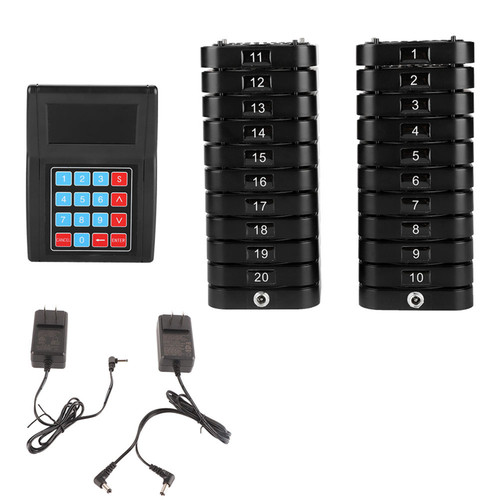
Product Overview
Watch Receiver:
Working Frequency: 433.92MHz
Battery Capacity: 400mah
Working Current: 56mA±10mA (buzzer mode)
95±10 (vibration mode)
Standby Current: 7mA±0.2mA
Receiving Sensitivity: -108dBm
Decoding: Learning the code
Waterproof Rating: IPX4
Working Temperature: -20℃~ 55℃
Button Transmitter:
Working Frequency: 433.92MHz
Material: ABS+PVC+Viscose
Battery: DC6V (CR2032x2)
Battery Capacity: 200mah
Emission Current: 10mA±3mA
Standby Current: <1uA
Open Distance: >200m
Keys: 1 million times
Waterproof Rating: IPX4
Working Temperature: -20℃~ 55℃
4 Buttons: Call, check out, place an order, cancel
How To Use:
Technical Parameters Working Frequency: 433MHz/315MHz
Working Current: <8.5mA
Standby Current: <20uA
Receiving Distance: Approx.100meters / 328.1ft (open distance)
Receiving Sensitivity: Better than -110dBm
Ambient Temperature: -20℃—55℃
Function Key Description:
Button Description: Short press-press for less than 1 second to release
Long press-press for 3 seconds to release
1. Settings/≡: Long press to enter the menu setting, short press to confirm and enter the next menu;
2. Upward/△: Short press for single upwards, long press for continuous upwards;
3. Scroll Down/▽: Short press to scroll down individually, long press to scroll down continuously;
4. Exit/: Short press to clear current call information, long press to delete all call information
In the setting state, short press to return to the previous menu, long press to return to the desktop (standby state)
Code:
When the code matching backlight is not bright, press any key to wake up the backlight and then operate
1. In the standby mode, press the "Settings" button once to enter the menu
Press the "Settings" key once again to enter and display 0000. The first digit is the area code (1-9A-Z). Each time you press ``Settings'', the polished bar will jump to the next digit. Press the last digit 0 and then turn it up to 1. At this time, it is the number 1, each number can only Learn a transmitter (maximum cannot exceed 999)
2. After selecting the number 0001, the watch will display "Uncoded"
Touch the transmitter and it will appear "code paired". This transmitter is successfully coded
At the same time, the number will automatically cycle to "0002" and then touch the transmitter without code matching to 0002, and so on to 999
Delete launcher
1. Delete all
In the standby mode, short press "Settings" once to check the code on the pager. Press "Settings" and then scroll down to delete all. Use the setting button to short press and then enter the password "8888" and long press "Settings" to delete all
2. Delete a single transmitter according to the code matching procedure, such as "0001" set to 0001 and long press the "Settings" table, it will show that the code has not been checked, indicating that it has been deleted
Key Function Setting:
1. After the user has learned the emitter, the function displayed by pressing the corresponding button of the emitter is inconsistent with the function on the emitter. At this time, it is necessary to reset the button functions of the emitter. Press the setting twice in the standby state to enter the menu and then Press "Up and Down" to move the cursor to "Key Position Function Setting" and then press to enter the waiting display 0000, the first digit 0 is "Zone 0 to 9 Zone A to Z" Press "Settings" to enter the setting according to the area you coded Later, for example, when it displays "Add Water", please touch the water button of the transmitter button. The watch will beep and display the correct setting, indicating that the setting is successful. Press the watch to scroll up and down "Call, Checkout, Order, Service, Cancel"
The Mode Is: "Change dressing, call, critically ill, remove needle, cancel" and display a function in the same way. Just touch the corresponding button of the transmitter. Just learn 1 transmitter. After setting, press the return button to return to the homepage.
Time Setting:
1. After entering the menu, scroll down the cursor to "Time and Date Settings", short press "Settings" to enter the menu, and then short press the settings to move the cursor to "Hours, Minutes, Seconds, Year, Month and Day", scroll up or down to the corresponding time setting and press The return key is success
Alarm Setting:
1. In the standby mode, press the setting twice to enter the menu and then press the "Up and Down" to move the cursor to the "Alarm Settings", then short press to enter the "Alarm Settings", short press to add the setting time, and then short press to set to The date "Up" is required and "Down" is the removal date
2. To delete the alarm, move the cursor to the set time and long press the "Settings" button to delete the setting and press the return button
Timing Clear Time Setting:
1. After entering the menu, "turn up and down" and move the cursor to "Timer Clear Time Setting", short press "Settings" and then enter and debug your time to "minutes". When you press the transmitter, the number of calls will be displayed. When there is no transmitter call within the selected time, it will be automatically cleared as the panel display time
Time Switch Signal:
1. The user can turn off the signal receiving module during the time when there is no need to receive the pager to avoid interruption and save power
2. After entering the menu, move the cursor to "Timer Switch Signal" and the time required for debugging is the same as "Alarm Setting"
3. If you need to delete, enter the ``Timer Switch Signal'' and long press ``Settings'' to delete.
Signal Reception Settings:
1. In addition to the timing switch setting, the user can also manually switch the receiving signal on or off in the "Settings". After entering the menu, move the cursor to the "Signal receiving settings" and short press to enter, then scroll up and down to open or close, and then press "Settings" again Back to the home page will be set successfully.
Call Alert Settings:
1. When The Transmitter Is Touched, The Machine Has 3 Kinds of prompts: "LED backlight", "vibration" and "buzzer", the user can choose one or more methods. After entering the menu, "turn up and down" to move the cursor Go to "Call Alert Settings" and short press "Settings" to enter, you will select the appropriate mode, press the "Settings" button and then return to the home page
Mode Setting:
This machine integrates the calling needs of "catering, bank, factory, Internet cafes"... and other occasion, the user can choose a mode that suits them, press the "settings" button to enter the menu, "up and down" to "mode settings" After entering, select your own suitable mode, short press ``Settings'' and return to the home page to set the success.
Language Mode:
There are two built-in languages in the machine, which are "Chinese" and "English". Users can have a suitable language according to their needs. After entering the menu, press "Up and down" to move the cursor to the language setting, and short press "Settings" to enter. Use up and down to select your own suitable language, short press the ``Settings'' button and press to return to the home page.
About This Machine:
1. The user can query the version information of the machine and the manufacturer's service phone. After entering the menu, use the "Up and Down" to move the cursor to "About This Machine" and short press the "Settings" button to query related information, or modify the manufacturer's service phone .
2. You can also modify the phone number to your company's number. After entering About this machine, long press the "Settings" button and a password will pop up. The company's password is "0086" and then long press the "Settings" button to enter the modification service phone, use "Up and Down" Scroll to the debugging number and short press the ``Settings'' button to skip to the next digit, and press the return button to return to the homepage after the modification is completed, which means the setting is successful.
Password Setting:
The user can modify the new password, the company password is "0086". After entering the menu, move the cursor to "Password Settings" to enter. First enter the old password and then long press to modify the new password. After entering, long press the "Settings" button, the new password Enter it again, and press the return key after setting is successful.
Features
1、The stylishly designed watch receiver adopts radio frequency wireless technology with stable signal transmission.
2、Dot LCD screen, information is clear at a glance, 10 transmitters, a receiver, support watch call to modify according to information.
3、A watch can only be equipped with 500 pagers at most, and supports single or list display mode.
4、Support accurate time display, vibration/buzzer prompt; use removable rechargeable battery, long standby time, charging circuit protection.
5、Suitable for homes, hotels, bars, restaurants, factories, workshops, tea houses, general clubs, bowling alleys, massage rooms, churches, casinos, country clubs, hospitals, healthy clubs, and offices.
Package List
1 x Watch Receiver
10 x Button Launcher
1 x User Manual
1 x Charger
1 x Charging Cable
10 x Viscose
Package Weight and Dimension
| Weight | 0.97 lb |
| Width | 6.24 Inch |
| Height | 2.73 Inch |
| Length | 6.24 Inch |