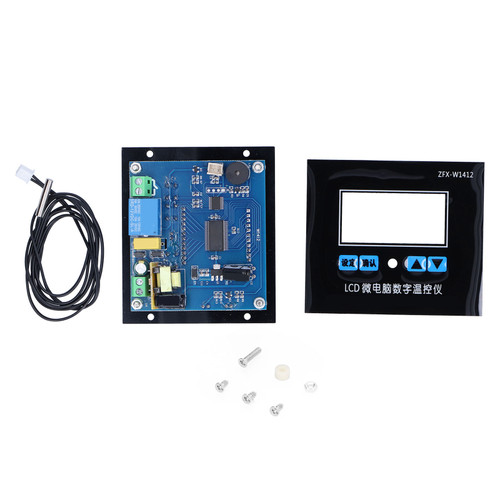
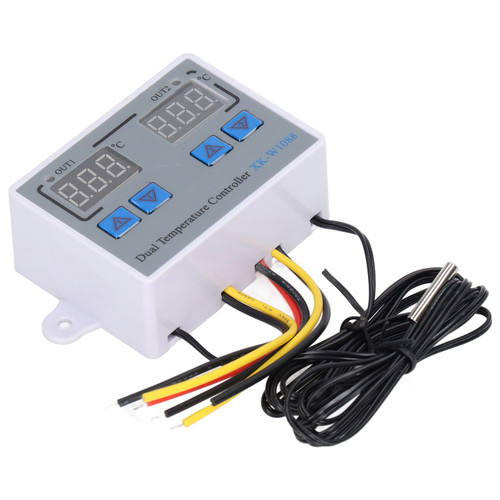
Product Overview
Features:
Specifications:
Temperature Measurement Range: - 50℃~110 ℃
Opening Size: 46*26.5mm
The Machine Power Consumption: static current is over 35MA, Pickup current is over 65MA
Methods of Use:
After Connecting to the power supply and load (referring to the wiring diagram), you can supply power for the controller, the color red manifest for measuring temperature, the following color blue (or red) as required to set the temperature
In the case of manifesting real temperature and please press the button set, the following setting text digital will flash and temperature, after completing the setting, please wait for 3 it will return automatically, at this time controller will automatically disconnect Relay according to the preset temperature, the this senor can meet all kinds of large power load, please make sure the line is correct
The Description of Light and Digital Tube Status:
Light: The off means Relay is disconnected, and the normal light on shows that the Relay has closed.
Digital tube: The sign LLL is the open circuit of sensor and the sign HHH means beyond the measuring range, the controller will forcibly disconnect Relay, the sign --- means high- temperature protection
The
Description of Parameters Function:
Please
press the button SET five seconds and then it can enter to the main menu of
setting, pressing STC(+)and C/F (-) can switch to P0-P8.
About
the adjustment of parameters P0-P8, when you need to adjust P0,
firstly please press STC (+) and C / F (-) at the same time, and the P0figurewill flash, secondly please press STC (+)and C / F (-) to adjust, if
done, finally please press STC (+) and C / F (-) to confirm at the same time,P1-P8
which can be set the parameters of each code like P0according to the needs of their own.
The key C/F is a key for switching Fahrenheit or
Celsius
Press the key C/F once, and it will manifest
F(Fahrenheit mode),and then press the
key C/F once, it will show C(Celsius mode), the default mode is C(Celsius
mode),if there is a big temperature error when you use it, maybe it is F mode.
An example for setting:
If you need to Control the
refrigeration equipment
1: Please set into C mode in the code P0:
2:In the
case of manifesting the actual temperature you should press the key SET, and
the following digital of setting text will flash, then press C/F
(+) and SET (-) to set the stop cooling temperature, after setting
please wait for 3 seconds, it will automatically confirm to return.
3:Return difference
setting: Firstly please press the key SET for five seconds all the time, and it
will enter the setting main menu, secondly press STC (+)and C
/ F (-) to switch into P1, when switching into P1,please press STC (+)
and C / f (-)once at the time, the P0figure will flash,
then please press STC(+)and C / f (-)to set to difference value(return
difference means that you should add several degrees to start, for instance, if
the it stops when the stop setting temperature is 25 degrees, you should need
to set the cooling temperature to 28 degrees, the value in the code P1should be set 3 degrees, so the return difference
value is 3 degrees),after finishing that, finally please press STC(+) C/F (-)
at the same time to confirm.
4:The above steps are
set up, the data is automatically saved, and the final result is, in the
control of refrigeration
equipment, higher than28 degrees to start the
refrigeration, refrigeration to 25degrees to stop.
If
you need to control the heating equipment:
1:
Please set into H mode in the code P0.
2:In the case of manifesting the actual
temperature you should press
the key SET, and the following digital of setting text will flash, then press
C/F (+) and SET (-) to set the stop heating temperature, after setting please
wait for 3 seconds, it will automatically confirm to return.
3:Return difference setting: Firstly please press
the key SET for five seconds all the time, and it will enter the setting main
menu, secondly press STC (+) and C / F (-) to
switch into P1,when switching into P1, press STC (+) and C / f (-) once at the time,
theP1figure will flash,
then please press STC (+) and C / f (-) to set to difference value(return
difference means that you should add several degrees to start, for instance, if
the it stops when the stop setting temperature is 25 degrees, you should need
to set the heating temperature to 22 degrees, the value in the codeP1should be set 3 degrees, so the return difference value is
3 degrees),after finishing that, finally please press STC (+) C/F (-) at the
same time to confirm.
4:When the above steps all are set up,the data are automatically saved ,so as controlling the heating equipment, it
will start heating system less than 22 degrees, and it will stop heating when
the temperature is 25 degrees.
Code
Explain
Setting range
Factory setting
P0
Heating/cooling
H/C
C
P1
Return difference
0.1-30
2.0
P2
Set limit maximum
+ 110
110
P3
Set limits to the minimum
-50
-50
P4
Temperature correction
-15-15
0
P5
Delay start
0-10
0
P6
High temperature alarm
-50~110
OFF
P7
CS/FH
cs
F8
Factory Reset
ON-OFF
OFF
1 x Temperature Controller
Specifications:
Temperature Measurement Range: - 50℃~110 ℃
Opening Size: 46*26.5mm
The Machine Power Consumption: static current is over 35MA, Pickup current is over 65MA
Methods of Use:
After Connecting to the power supply and load (referring to the wiring diagram), you can supply power for the controller, the color red manifest for measuring temperature, the following color blue (or red) as required to set the temperature
In the case of manifesting real temperature and please press the button set, the following setting text digital will flash and temperature, after completing the setting, please wait for 3 it will return automatically, at this time controller will automatically disconnect Relay according to the preset temperature, the this senor can meet all kinds of large power load, please make sure the line is correct
The Description of Light and Digital Tube Status:
Light: The off means Relay is disconnected, and the normal light on shows that the Relay has closed.
Digital tube: The sign LLL is the open circuit of sensor and the sign HHH means beyond the measuring range, the controller will forcibly disconnect Relay, the sign --- means high- temperature protection
The
Description of Parameters Function:
Please
press the button SET five seconds and then it can enter to the main menu of
setting, pressing STC(+)and C/F (-) can switch to P0-P8.
About
the adjustment of parameters P0-P8, when you need to adjust P0,
firstly please press STC (+) and C / F (-) at the same time, and the P0figurewill flash, secondly please press STC (+)and C / F (-) to adjust, if
done, finally please press STC (+) and C / F (-) to confirm at the same time,P1-P8
which can be set the parameters of each code like P0according to the needs of their own.
The key C/F is a key for switching Fahrenheit or
Celsius
Press the key C/F once, and it will manifest
F(Fahrenheit mode),and then press the
key C/F once, it will show C(Celsius mode), the default mode is C(Celsius
mode),if there is a big temperature error when you use it, maybe it is F mode.
An example for setting:
If you need to Control the
refrigeration equipment
1: Please set into C mode in the code P0:
2:In the
case of manifesting the actual temperature you should press the key SET, and
the following digital of setting text will flash, then press C/F
(+) and SET (-) to set the stop cooling temperature, after setting
please wait for 3 seconds, it will automatically confirm to return.
3:Return difference
setting: Firstly please press the key SET for five seconds all the time, and it
will enter the setting main menu, secondly press STC (+)and C
/ F (-) to switch into P1, when switching into P1,please press STC (+)
and C / f (-)once at the time, the P0figure will flash,
then please press STC(+)and C / f (-)to set to difference value(return
difference means that you should add several degrees to start, for instance, if
the it stops when the stop setting temperature is 25 degrees, you should need
to set the cooling temperature to 28 degrees, the value in the code P1should be set 3 degrees, so the return difference
value is 3 degrees),after finishing that, finally please press STC(+) C/F (-)
at the same time to confirm.
4:The above steps are
set up, the data is automatically saved, and the final result is, in the
control of refrigeration
equipment, higher than28 degrees to start the
refrigeration, refrigeration to 25degrees to stop.
If
you need to control the heating equipment:
1:
Please set into H mode in the code P0.
2:In the case of manifesting the actual
temperature you should press
the key SET, and the following digital of setting text will flash, then press
C/F (+) and SET (-) to set the stop heating temperature, after setting please
wait for 3 seconds, it will automatically confirm to return.
3:Return difference setting: Firstly please press
the key SET for five seconds all the time, and it will enter the setting main
menu, secondly press STC (+) and C / F (-) to
switch into P1,when switching into P1, press STC (+) and C / f (-) once at the time,
theP1figure will flash,
then please press STC (+) and C / f (-) to set to difference value(return
difference means that you should add several degrees to start, for instance, if
the it stops when the stop setting temperature is 25 degrees, you should need
to set the heating temperature to 22 degrees, the value in the codeP1should be set 3 degrees, so the return difference value is
3 degrees),after finishing that, finally please press STC (+) C/F (-) at the
same time to confirm.
4:When the above steps all are set up,the data are automatically saved ,so as controlling the heating equipment, it
will start heating system less than 22 degrees, and it will stop heating when
the temperature is 25 degrees.
Code
Explain
Setting range
Factory setting
P0
Heating/cooling
H/C
C
P1
Return difference
0.1-30
2.0
P2
Set limit maximum
+ 110
110
P3
Set limits to the minimum
-50
-50
P4
Temperature correction
-15-15
0
P5
Delay start
0-10
0
P6
High temperature alarm
-50~110
OFF
P7
CS/FH
cs
F8
Factory Reset
ON-OFF
OFF
1 x Temperature Controller
Features
1、This delicate digital display temperature controller can set Celsius mode or Fahrenheit mode
2、The display and control temperature can be set to 0.1℃. It is convenient to install and wiring is simple
3、Wide temperature measurement range from -50℃ to 110℃ and supports high temperature protection
4、Can be installed directly or embedded in industrial control equipment panel, convenient and quick
5、Widely used in the hatching area, equipment case, air conditioning system, temperature control protection and other fields
Package Weight and Dimension
| Weight | 0.66 lb |
| Width | 2.34 Inch |
| Height | 1.56 Inch |
| Length | 2.73 Inch |