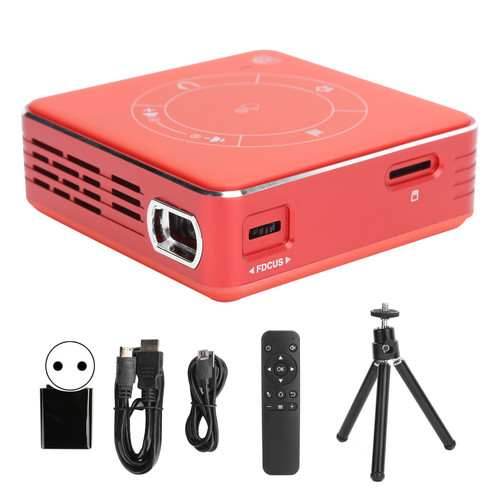
Product Overview
Model: C99
Type: Multifunctional
System: For Android 9.0
Processor: For ARM Mali-G31 MP2 GPU
Built-in: 4G+32G
Resolution: WVGA 854 x 480
Brightness: 55 ANSI Lm
Lamp Type: LED
Input Port: High definition multimedia interface input; USB; TF card
Projection Technology: DLP
Speaker: 1 x 1W
Screen Ratio: 16: 10: 00
Power Supply: AC100-240V, 50/60Hz DC 5V 3A
Power Consumption: Optical Machine: 3W, Whole Machine: 5W
Contrast Ratio: 500: 1
Projection Distance: Approx. 1-5m / 3.3-16.4ft
Built-in Battery Capacity: 3000mAh
How to Use:
1. Turn On: First turn the power switch to the "ON" state, then press the start switch to turn on, the indicator light is blue, waiting for the screen to display; if the battery is low, please connect the power adapter to the charging port of the projector to charge.
2. Clarity: Turn the focus gear of the projector up and down to adjust the clarity of the picture.
3. HD Input: Connect one end of the HD cable to the HD input interface of the projector, and connect the other end to the HD output interface of the computer/other equipment, and enter the "HD input" on the main interface of the projector.
4. Trapezoid Correction:
A. Vertical Trapezoid Correction: Enter "Settings" to "Vertical Trapezoid Correction" on the main interface, the machine defaults to automatic correction, and manual correction is also supported.
B. Horizontal Trapezoid Correction: Enter "Settings" to "Projection Settings" and then "Horizontal Trapezoid Correction" on the main interface, which supports manual correction and multi-angle adjustment.
5. Wifi Settings: The main interface enters "Settings" to "WiFi Settings", click the switch to the "ON" state, select the network that needs to be connected, enter the password, and click "Connect".
6. Bluetooth Settings: The main interface enters "Settings" to "Bluetooth Settings", click the switch to the "ON" state, search for the device that needs to be connected, and pair it.
7. On the main interface, enter "Settings" to "Language Settings" and select the language to be switched.
8. Shut Down: First press the start switch, the interface pops up a shutdown prompt, click "confirm" to shut down, after the projector stops moving, turn the power switch to the "OFF" state, otherwise the battery will still be in a good state.
Features
1、The mini projector has 4G running memory and 32G built-in memory, and supports Bluetooth and WiFi wireless connections.
2、High-definition 4K hard decoding and full HD resolution, 5G/2.4G dual-frequency channels, 5G no-stutter viewing.
3、Under the same WiFi, mobile phones or tablet devices can share the same screen with one key, and enjoy watching movies on the big screen anytime, anywhere.
4、Diffuse reflection light is not direct, weakening the dazzling blue light, and softer eye protection.
5、The high-definition lens, built-in wear-resistant coated glass lens, and high-quality LED bulbs ensure the screen is bright and stable.
Package List
1 x Projector
1 x Remote Control
1 x Bracket
1 x Charging Head
1 x High Definition Multimedia Interface Cable
1 x Data Cable
1 x User Manual
Package Weight and Dimension
| Weight | 1.29 lb |
| Width | 4.68 Inch |
| Height | 3.51 Inch |
| Length | 5.85 Inch |